Bracing - Diagonal
(Revised: 07/06/09)
The Bracing Diagonal Tier screen is used to edit standard clearance
dimensions for a bay or entire wall of bracing.
|
Wall Detail Dimension
Between Tiers: From
the Center Line of the Strut, To the Center Line
of the next Strut. From
the Center Line of the Strut, To the Base of
the Column Web. (Not to the
Bottom of the Base Plate) |
Roof Detail Dimension
Between Tiers: From
the Center Line of the Strut, To the Center
Line of the next Strut. From
the Center Line of the Strut, To the End of the
Eave Rafter Web. (Not to the
Building Line) |


Dimensions:

Lower Left – Dimension (A)
Upper
Left – Dimension (B)
Lower
Right – Dimension (C)
Upper
Right – Dimension (D)
The
space from the nominal location (Base of the Column Web, Strut, or End of the
Eave Rafter Web) to the Rod (slot or clip) Location.
Refer
to pictures above for locations.
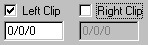
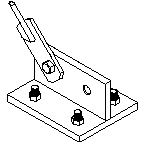
Floor Clip at Left
This
check box identifies that a clip is required at the lower left.
Floor Clip at Left – Dimension
Refer
to picture above for Dimension from centerline of frame to locate the clip.
Floor Clip at Right
This
check box identifies that a clip is required at the lower right.
Floor Clip at Right – Dimension
Refer
to picture above for Dimension from centerline of frame to locate the clip.
„
Recommendation:
When Floor Clips are used, attempt to
keep the floor to rod angle should between 30 and 60 degrees.
Member
Properties:
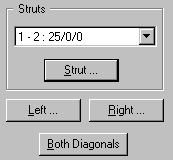
Struts
From
the drop down list select the bay and elevation of the strut you want to
revise.
Strut
Screen
used to modify strut information.
Diagonal - Lower Right - Properties
Screen
used to modify bracing diagonal that starts at lower right.
Diagonal - Lower Left - Properties
Screen
used to modify bracing diagonal that starts at lower left.
Diagonal - Bothe Diagonals - Properties
Screen
used to modify both bracing diagonal at the same time.
Standard
Controls:
See also:
§ Bracing -
Diagonal - Description
§ Bracing -
Diagonal - Connections